
The first part introduced my Raspberry Pi tower and some of the progress I’ve made in interfacing with OLED and LCD devices over I2C. Now, I’m going to talk about some of the infrastructure software used in the system.
Gentoo Linux
Firstly, as I introduced previously, I’m using Gentoo Linux as the base OS layer for the cluster. Gentoo was one of the first distributions I used: I have been using it for over 20 years, often for the more experimental Linux programming projects I’ve done. I have even used Gentoo as a desktop. When I researched what system to use for the Pi tower I considered Raspberry Pi OS (it’s the “default choice” for Raspberry Pi builds), but since it has the ability to function as a full desktop system in its own right I wanted to use a much lighter-weight platform. The Gentoo project maintains guides on using Gentoo for Raspberry Pis so I didn’t feel like I would be trailblazing.
I re-implemented some techniques I used many years ago in running a test lab of virtualised Gentoo Linux systems. The distributed compilation approach using distcc is supported in Gentoo’s build system and well documented, and sharing the Gentoo software management directories using NFS is something I’ve done extensively in the past as well. The one new part to this I’ve added is the use of Ansible to front-end the interaction with the package manager across the cluster nodes.
A word about distcc
distcc is a program that manages the distribution of compilation tasks across a number of compute hosts. It is not a compiler in its own right, but the scheduler of compilation tasks. When a moderately high-speed network is available between hosts, it can speed up compilation significantly. The speed improvement is not linear however, since not all parts of a software package build can be handled by distcc; the configure job at the start (if the package uses autotools) and any linkage tasks have to be done on the initiation host. However, to me it is one very easy way to demonstrate clustering — there is no shared storage required (all hosts require the same compiler and the same libraries and headers to be pre-installed). distcc sends the source file to the target, along with the specific compilation command (with options) to be run, and the target runs the compile and sends the resulting object back to the initiator.
Gentoo and distcc
As mentioned previously, the first of the Pi systems is the “controller” of the cluster. It hosts the main artefacts of Portage (the Gentoo software management environment) for the rest of the cluster — this includes the binary packages built by the controller, as well as the Portage database tree. Its Portage configuration file /etc/portage/make.conf also contains the settings to activate distcc for builds and to build binary packages by default.
The rest of the Pi nodes have much the same build in terms of installed software, although they are configured only as distcc targets. I thought it would be unnecessary to have full matrix configuration of distcc across all the nodes, thanks to Gentoo’s ability to not only build but install from binary packages. I can install a package on the controller node, using distcc to distribute the compilation across all six Pis and automatically building a binary packages when complete, and then install the binary package on the remaining five nodes.
Having built the infrastructure to support easy software installation and updates across the cluster, I started to think about usability of the system. Running an emerge command on the controller node was pretty easy, and having set up SSH key-based authentication to the remaining nodes it was easy to fire off the corresponding emerge command to the remaining systems over SSH. Even an emerge @world command — think apt-get upgrade or dnf update, to perform a system update — would be easy to wrap in a Bash script for-loop.
Ansible
I’ve been using Ansible a lot over the last few years, mostly in the context of the z/VM ESI system I’ve written about previously. As I contemplated writing a Bash script to wrap those SSH emerge commands, I realised Ansible would be a better approach. As it turns out, there is a Gentoo collection for Ansible that contains an emerge module — but even if this didn’t exist, using Ansible to run commands across the Pi nodes would be much more manageable.
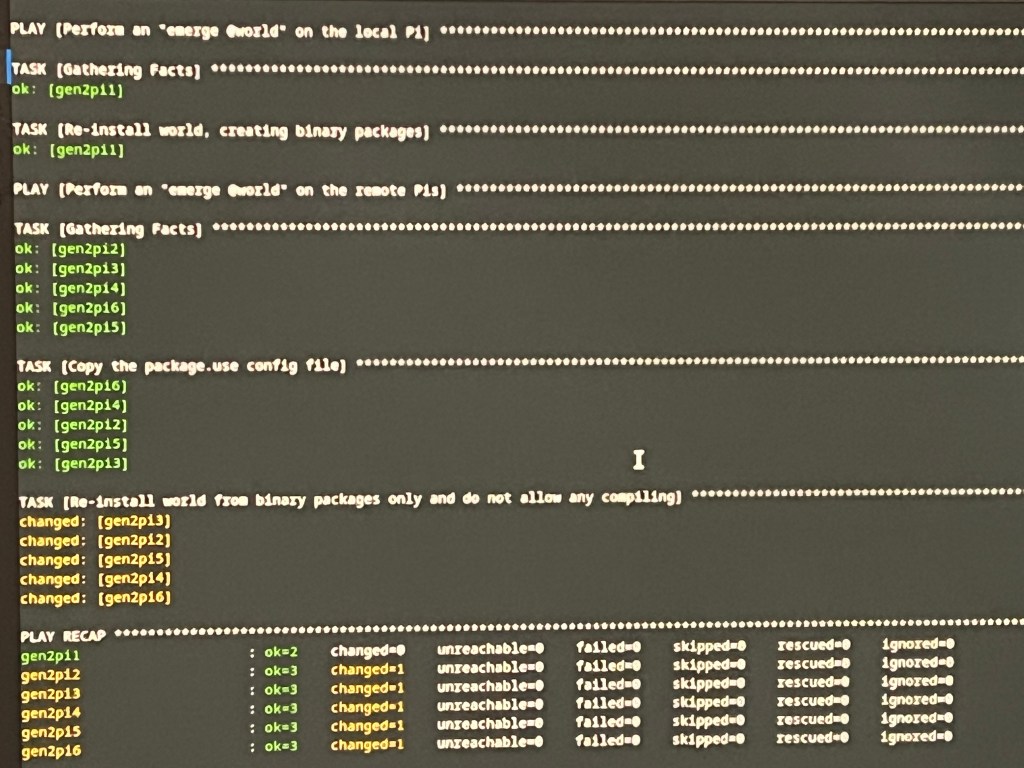
I will be expanding the use of Ansible in my Pi tower installation to include configuration management. When I set up the tower, I created the nodes by copying the MicroSD card of one of the nodes and just changing the IP address and hostname. As I install more packages onto the nodes, the need to apply configuration to the nodes is likely to increase. I have seen this already in Portage itself, where changes in USE flags needed to build a package on the controller node have to be applied to the other nodes as well in order for the binary package to get installed.
Munin
When doing projects like these I always want to have some kind of monitoring. I bought USB cables with embedded digital watt meters so I can see my Pis’ power consumption, but I also want details about system activity and resource usage. I have used tools like Nagios, Cacti, and Zabbix in the past, and also used Ganglia in one of my more exotic projects, but something drew me to Munin this time around.
While Munin requires an agent to be installed, this agent provides very detailed information — far more detailed than I’ve seen in tools like Cacti that use SNMP. It was quite simple to get set up in the end, and I can see good data about the resource usage and activity of all the RPis. This gave me extremely useful insights when starting to work with the 20×4 LCD…
Speaking of interfacing with displays, that will might be the topic of the next instalment in the series!


